Until now, the moment an order couldn't be filled in full — QC packed only part of it, or every line came up out of stock during picking — the warehouse would keep those un-shipped units committed to the order. When the next shipment of that SKU arrived, the new stock would land in your bins but stay invisible to new orders, quietly held against a backorder that, in practice, no one was actively fulfilling.
This release fixes that. With the new Release commitments for backordered items setting turned on, leftover units are released the moment they become a backorder. Receive a new case of a popular SKU and it's instantly sellable again.
The setting ships off by default so nothing changes the day you deploy. When you're ready, audit your historical backlog with the new tools, clear it once with the backfill command, then flip the toggle.
A New Setting in Inventory Settings
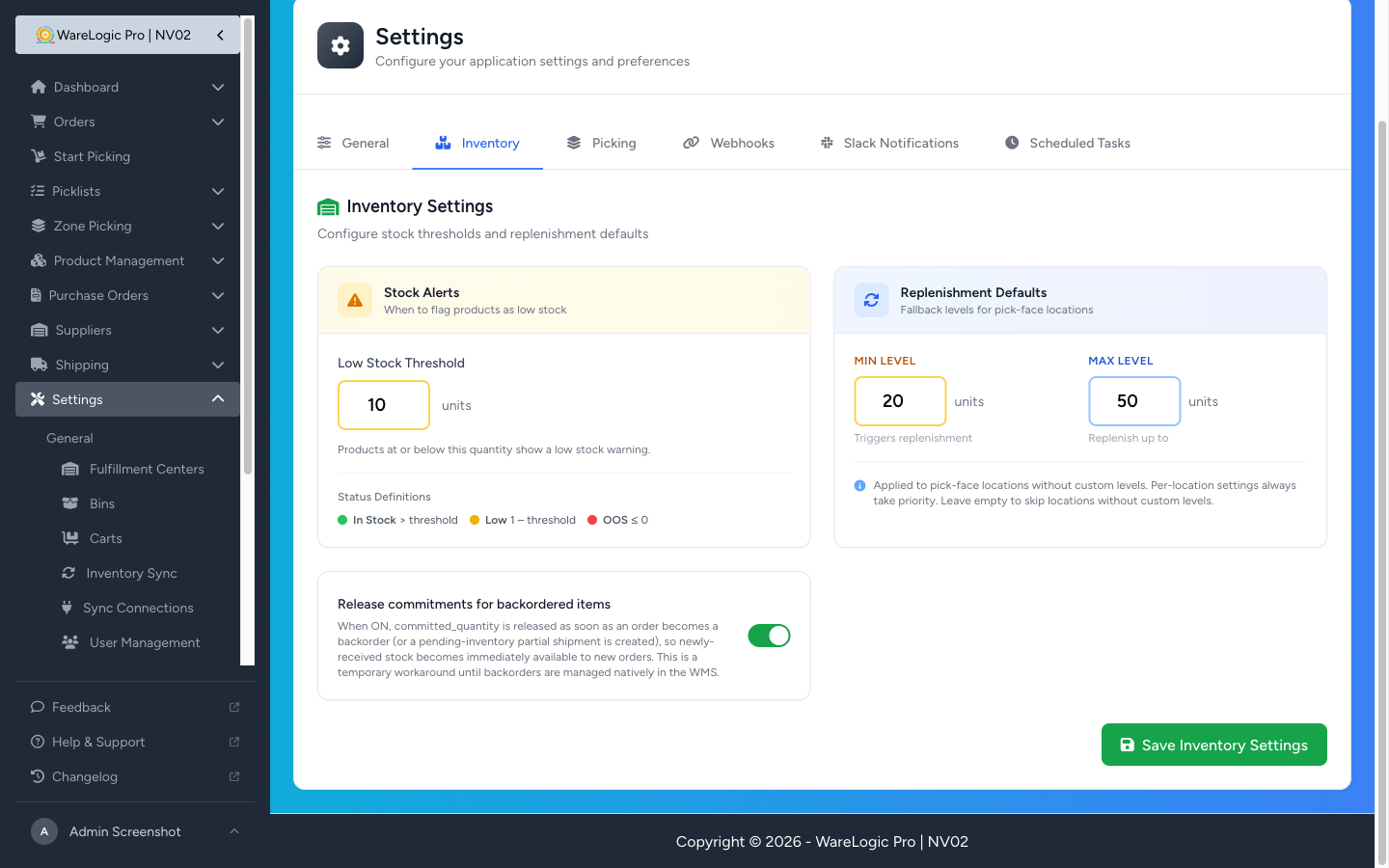
- Open Settings → Inventory and you'll find a new toggle: Release commitments for backordered items.
- Off by default — the existing behavior (keep stock reserved against backorders) is preserved until you opt in.
- When on, two flows release stock automatically: QC partial fulfillment (the unshipped portion drops the reservation when the partial confirmation dialog is submitted) and picking with everything out of stock (the whole order's unfulfilled quantity is released the moment it's flagged as a backorder).
The "Available" Badge Can Now Go Negative
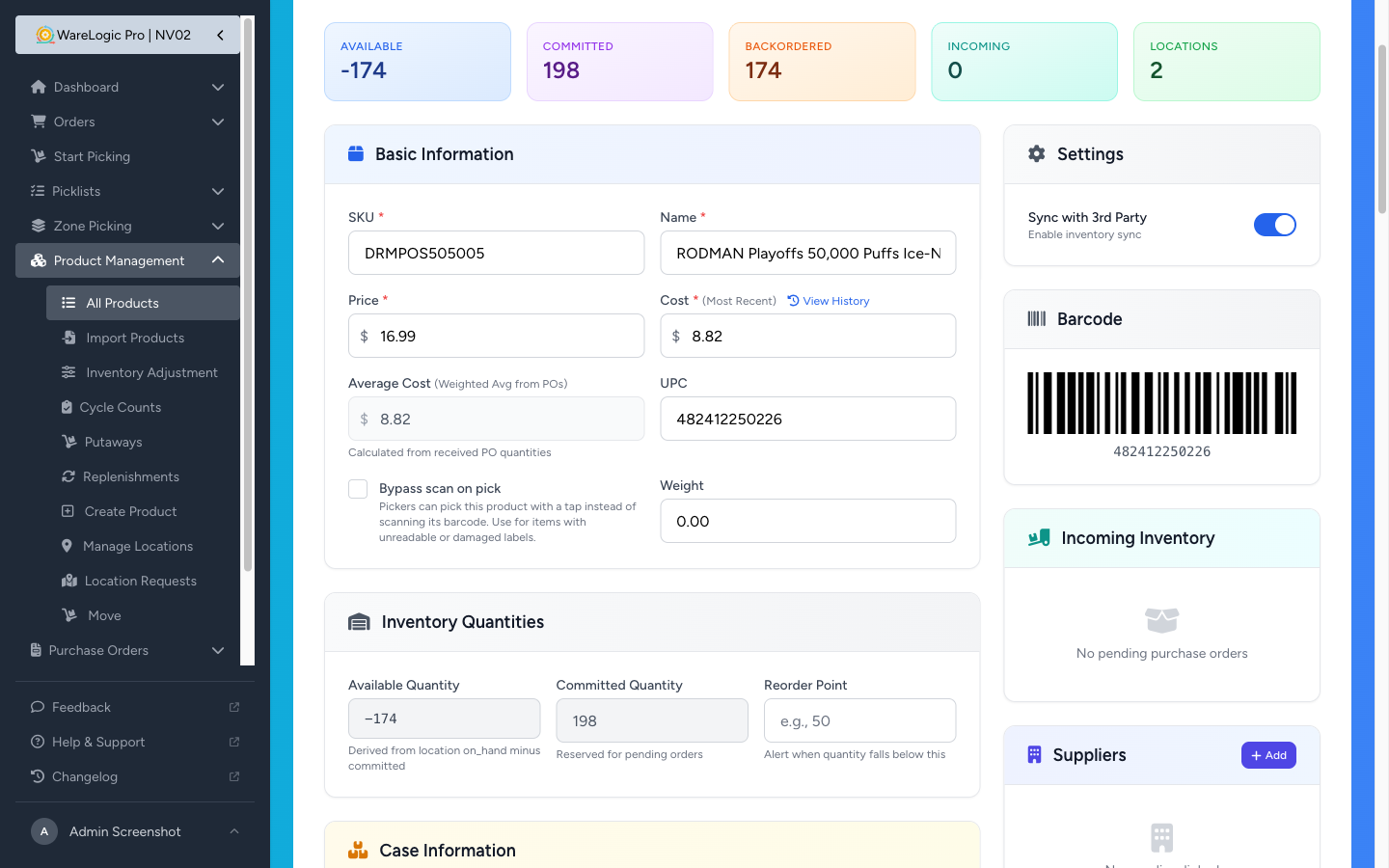
- Before, the Available number on product pages and the products table was clamped to 0 even when the product was oversold. That number is now allowed to go negative.
- A negative Available is the backorder count — if you see
-12, it means twelve more units are committed to open orders than you physically have on hand. Easier to spot at a glance than a separate counter. - The Backordered badge keeps showing the positive view of the same number (so it shows
12in the example above) — both stay in sync automatically.
Operator Tools for the One-Time Cleanup
Before flipping the new setting on in your warehouse, you'll want to clear out the historical backlog of backorders that have been silently holding inventory. Two new commands handle that:
inventory:audit-backorder-commitments— read-only. Lists every product whose commitment would be released, with a WOULD_MAKE_AVAILABLE flag highlighting the products where releasing the commitment would immediately make stock available to new orders (the cases that deserve a physical audit before you act). Supports--csv=...to export the list and--sku=...to drill into a single product.inventory:release-backorder-commitments— the actual cleanup. Dry-run by default; pass--applyto write changes. Idempotent: every release is logged to the activity feed, and re-running the command skips lines that are already done.--order=<order_number>lets you process one order at a time if you want to validate as you go.
The recommended sequence:
- Audit —
php artisan inventory:audit-backorder-commitments --csv=/tmp/audit.csv. Review the rows flagged WOULD_MAKE_AVAILABLE with whoever owns physical inventory. - Dry-run the cleanup —
php artisan inventory:release-backorder-commitments(no--apply). Confirms the per-order plan. - Apply —
php artisan inventory:release-backorder-commitments --apply. Releases the backlog. - Flip the toggle in Settings → Inventory. From this point on, new backorders release their commitments automatically.
Why It Matters
If you've ever received a shipment, checked the product page, and wondered why the Available number hadn't budged — this was almost certainly the reason. The new behavior lets your inventory respond to receiving the way you'd expect: fresh stock in, fresh stock available, no manual reconciliation.
This is a temporary step. The longer-term plan is to manage backorders as first-class objects in the WMS (so you can see what's queued, prioritize, and fulfill them when stock catches up). Until then, releasing the commitment is the cleanest way to keep your inventory honest.